Since all of us are fixing bugs, there is not much to report. So I will take this opportunity to rant about game design, gameplay design and UI. Please note that these are my (Twinsen) personal opinions and do not necessarily reflect Factorio's direction. Nonetheless it should make for an interesting Friday Facts.
Factorio Nomenclature Abregado Today I want to discuss some common problems that we see in video games. Inconsistent Terminology When I asked out loud "So what is an Intermediate Product anyway?", I got a similar reaction as when someone mentions The Berlin Interpretation at a rougelike convention. So what is an Intermediate Product? Well it is a product that is used only as an ingredient for something else. No, that's not right because Science Packs are not used in any recipe. So what then, Intermediate products are just things that you can use Productivity Modules on? Perhaps they are simply items that can be found in the Intermediate Crafting menu. Then are they not Intermediate Recipes? To give another example, answer these questions: Name the action a player performs when they add an entity to the world? Name the action a player performs when they remove an entity from the world? Name the action a player performs when they add a ghost entity to the world? Name the action a robot performs when they add an entity to the world? Name the action a robot performs when they remove an entity from the world? Here are a few situations where the game displays your possible answers: A player builds. A player mines entities. Robots repair and build entities, but wait… the player places buildings and builds ghosts? But here Robots are constructing machines. Here the robots are deconstructing items! This leads into a discussion about what is an item and what are entities, and that discussion leads us into the next point... Internal nomenclature leaking out During game development it is very common to use internal names to refer to mechanics, items, or characters. It does not feel like such a big deal, and many early access games simply ignore the problem completely. I'm not going to point any fingers, but if you look you will find some examples. Oh wait, here is some from your favourite early access game! Internally, things that exist on a surface in the game are called entities. All these items are capsules internally, but only 5 of them are actually labelled as capsules. Really, these should be categorised by how players use them, and indeed there is an attempt to do so. Remotes are items used to trigger an effect, Grenades are things you throw... but why is the Poison Capsule not called a gas grenade? There are more inconsistencies but to keep this article reasonably not-short, I will let you find the others yourself (and to save something for a future FFF about Tooltips). Why change? You might be thinking that this is not a big problem. Some others might be thinking that the problem is too pervasive to bother changing. There are a few reasons why it is important, the first, and most important of which is our quality mindset; everyone on the team here wants the game to be as great as possible. Next we should see this increase the quality of the translations. A translation is only as good as its source, and having a consistent usage of words can go a long way to helping the translators do better work. The effect of this can be increased by providing a dictionary of important words to the translators so they can be sure to always use the same term in all places. Since we are also working on a guided experience (Campaign), this would also help us give much clearer instructions to the player. An example of confusion here would be if one quest said "Place a chest" and another said "Place the item in the chest". The player needs to read the entire quest caption (probably twice), and can never build up a mental map of our language. This leads to the player spending more mental energy (cognitive load) while playing the game. Changing this to "Build a chest" and being consistent, allows the player to create mental shortcuts, meaning the quest tasks require less effort to understand. Finally, consistency in terminology will help new players, and I don't just mean sub-1 hour playtime players. Factorio is a 'Big Game' and players are encountering new items, entities, concepts, and text for a long time. How many hours did you play before you discovered this helpful trick, or this one? How to change? We could make the vocabulary consistent with what the current player base uses. This option sounds pretty good until I started asking people questions similar to those I asked you at the beginning of the article. Here are another two as a refresher: Where do biters come from? I come in 7 colors, what am I? The only wrong answer is if you said there was only a single right answer. Prepare your rotten tomatoes, Ben is about to say something unpopular. The influx of players that are to be expected from 1.0 give us an interesting option. We could theoretically change the vocabulary of the game to be more consistent, reasonable, and generally more helpful to players. Then, as new players join the community, this new language will slowly replace the old. This would help ease communication between all players; veterans and new addicts alike. Consistency will also help polish the experience to the level that players expect from the game. Who should change it? Before Rseding jumps in with some awesome news, I would ask you to have your say in this Google form. It will be fun to see what you come up with, and I will publish the results in a few weeks.
Hello, Grab your best lube, because it's time to talk about fluids!
Hello, We are a bit busy this week hosting a small LAN party with some fans and community members to playtest the Space Age expansion, so this FFF might be a little bit shorter than normal.
A long time ago, in FFF-191 I wrote about improving the GUI. Well, things are finally starting to move, so this week I'll bring you an update on that. We even have a GUI team: Twinsen(me): UX and programming Albert: UI, graphical design, layouts, mockups, UX Rseding91: main programming and GUI internals The plan is to go through the entire game's GUI (including main menu, all entity GUIs and all game windows) and improve it both visually and interaction wise. This is quite a huge undertaking because: Factorio's interactions are quite complex If you count all the entity windows and panels, we have about 120 windows to go through in the game. Mods can change many aspects of the game so we have to account for that to make sure windows still look good and are still easy to use: e.g. having 15+ recipe categories, having assembling machines with 20+ module slots, having recipes with 20+ ingredients, having players with 200+ inventory slots, etc. Many players are already used to interacting with the game in a specific way, so any major changes are hard to make. Our GUI back-end (heavily modified AGUI) is not exactly well written, programmer-friendly, or feature-rich. Many of the features and polishing we want to add were not done previously due to their programming complexity. At the moment we are still early in the project, just defining the style and the concepts. During the next months, I'll try to make a series of FFF talking about the improvements we are making (starting with this one) so you can see how the project progresses, and offer feedback along the way. Everything I mentioned in FFF-191 will be there, but we have even more cool improvements coming to the toolbar that we are working on, so today I'll talk about something else: the new train/locomotive GUI. Disclaimers: Everything you see are mockups made by Albert and are not from the game, but we will try to make it look almost identical in game. The style (colors and look) is not final. This is the 3rd iteration and Albert is still experimenting with making everything look nice. The purpose of these mockups are mostly to define the layout and interaction. This is how the new Locomotive GUI will look. As you notice, apart from the style changes, they way the stations and conditions are shown is very different, but I'd say much more intuitive, informative, and easy to use. Let's go through a short use case. You click add station and the list of stations appears. You can add a station by clicking on the station in the list or by clicking it in the small map. The map can be zoomed and moved around so you can easily find your station. Also, as you hover over stations in the list, the map will show their location. The stations marked differently are unreachable from the train's current position. This way you can more easily recognize and possibly ignore stations outside of the current network. Once you click a station, it is added to the schedule, along with a default condition. You can continue adding more stations, or add/edit the conditions for the new station. Finally a schedule can look something like this. The path of the train will be shown. We will try to paint the path the train is taking at the moment, it will change as the train takes different paths. The fuel can be accessed from the separate tab and the color of the locomotive can be changed using the color picker. The buttons in top of the map, from left to right are as follows: Turn station names on or off. Change the angle of the station names. Switch to map view. Switch to camera view. Center view on the train. The small 'info' button you see on the right side will be a help button we will use throughout the game to help explain how different GUI work and when their elements mean. We will write more about this in some of the next parts of the FFF GUI update series. We also want to add a neat tool for advanced players. Control-clicking on any point on the locomotive's map (or any station) will add a 'Temporary stop' to it's schedule. The train will try to go as close as it can to that point, wait a few seconds and finally automatically remove the 'Temporary stop' from it's schedule. This is very useful for quick transportation. It also allows you to quickly 'hijack' an existing train and use it to get somewhere, since the 'Temporary stop' will be deleted and the train's normal schedule will be resumed. Another quality of life improvement will be a game option to automatically add some fuel from the player inventory when building vehicles (car, tank or locomotive), making rail transportation as simple as placing a locomotive on a rail, entering it and control-clicking where you want to go. We hope you like the proposed changes. No doubt things will change as we implement and playtest these changes, but we thought it would be interesting to show you an early preview. Finally the million dollar question is when will this be in game? Because it's quite a bit of work we already pushed the GUI update to 0.17. On the bright side, this mean 0.16 will come a bit sooner. Let us know what you think by commenting in our usual topic at the forums.

Hello, if we have any circuit lovers reading, this is another dose of facts for you.
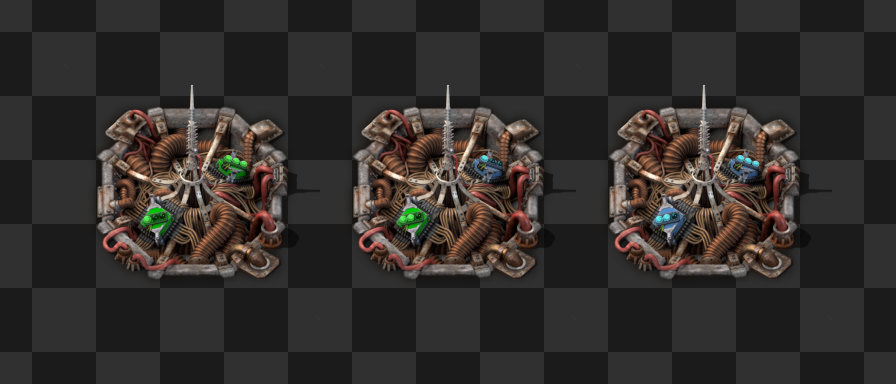
The Beacon Redesign V453000 The Beacon is one of the last entities that don’t have high resolution graphics yet. In the rather recent FFF-339, Albert presented the updated and redesigned Beacon. After your responses we realized some issues we hadn’t seen with the Beacon before, and we have taken some time to think about it... The red tower design by itself is very impressive, which gave it so many plus points that we didn't focus enough on the fact that it is taking too much visual attention. In this case, this happens because of aggressive red colours, the big contrasty yellow eye-like circle, the entity being quite tall, and the electric beam animation. Random variations are usually helpful to make entities look nicer in clumps (like resources), but not in this case, especially as other built entities don’t have any variations. The options to take from here would be to either update the original design, adjust the red tower, or start a new redesign. The Beacon is a very special entity, either it doesn’t appear in a factory at all or very little, or it’s everywhere. It doesn’t really do anything by itself so it doesn’t really need to show much activity either. The original design has its own problems and also saturates the screen very quickly, as they are bright, also tall, and they always move, attracting attention to the movement constantly. As for the red tower, most of the top part would have to be removed which is almost a complete redesign already, but parts of the hole could be recycled for a new version... We chose to start a new redesign, with the design goal of the Beacon trying to take much less attention.

1.1 stable kovarex Hello, we have a stable version! When we were releasing the 1.0 FFF-360, we actually stated that there were "around 150 bugs on the forums and around 80 internal tasks to be solved". These were obviously minor issues, things hard to reproduce or very rare problems. In other words, it was quite reasonably stable, which normally goes without saying when it comes to Factorio stable versions. But it proved to be a mistake wording it this way, since some media picked up on it and presented it as a "fairly bugged release". So I'm pretty thrilled to finally get to the point, where we actually have 0 known issues and 0 active bug reports on the forums. Its like cleaning the kitchen properly, so you can start cooking something fresh. More about that next week! For now, we want to go over some of the features of the 1.1 that you might have missed until now if you've been sticking with stable 1.0.

Environmental particle effects Dom Since the particle optimization we did for 0.18 (FFF-322) and the introduction of new explosions (FFF-325), we were able to push our vision even more. It always bothered me that the grenade and other explosions would emit the same type of particles regardless of the context. In most cases it isn't that bad, and somewhat okay, but when you throw a grenade into water, it will still emit stone particles, which breaks the illusion. Another problem is that we have the nice decoratives on the ground, but they don't really 'interact' with anything that goes on, and can feel like fake flat stickers instead of something 'real'. You would expect that when there is a massive explosion 2ft away, the bushes might have some reaction to that. The explosion effect currently in 0.18

Hello, Today we're going to take a look at a feature some of us have dreamt of changing for years now - the beacon transmission. The main purpose of beacons is to allow massively increasing your production in the late game while being more than just a module or a faster machine. To make use of beacons you need to adjust your building layout for them. Beacons succeed in this role, but...
